
💻 โปรแกรมใช้บนคอม Windows💻 TevadaPro runs on a Windows PCเปิดลิงก์นี้บนคอมเพื่อดาวน์โหลดOpen this link on your PC to download it.
A farming bot in Thai
farms all night
บอทฟาร์มภาษาไทย
ฟาร์มให้ทั้งคืน
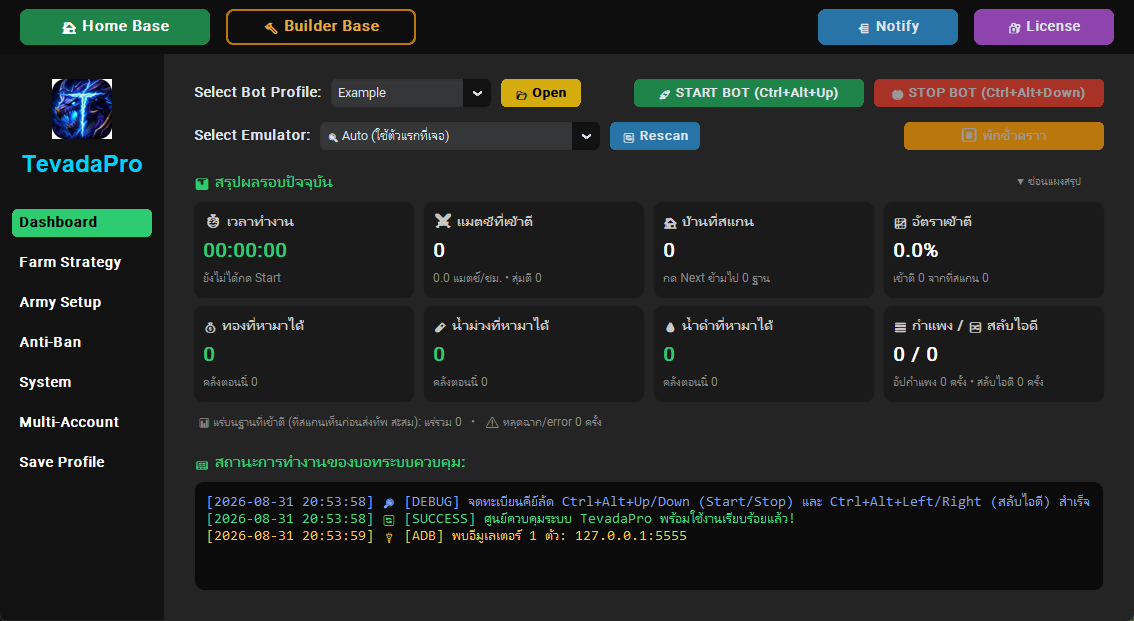
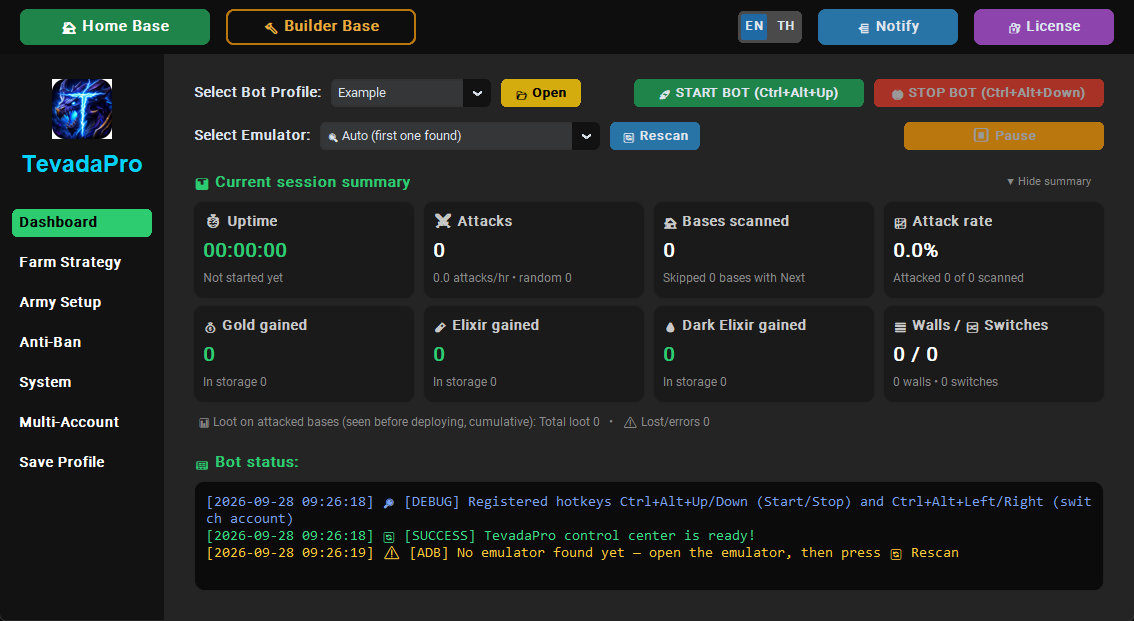
An ordinary PC is enough. It farms all your accounts overnight in one emulator: finds bases, attacks, collects loot and upgrades walls by itself. Check the results from your phone when you wake up.
คอมธรรมดาก็ใช้ได้ ฟาร์มทุกไอดีของคุณให้ทั้งคืนในอีมูตัวเดียว หาฐาน ตี เก็บของ อัปกำแพงเอง ตื่นมาดูผลจากมือถือได้
🎁 A friend invited you. Try it free first, and your first plan comes with a bonus +1 day.เพื่อนชวนคุณมา ลองฟรีก่อนได้ และเติมเงินครั้งแรกแถม +1 วัน
From 59 THB / 7 days · pay by PromptPay or TrueMoney · no payment needed for the trialเริ่มต้น 59 บาท / 7 วัน · จ่ายผ่าน PromptPay / TrueMoney · ทดลองฟรีไม่ต้องจ่ายก่อน
ยอดฟาร์มรวมของสมาชิกMembers' total farm
ทองGold
—น้ำม่วงElixir
—น้ำดำDark elixir
—ทดสอบรันจริง 1 ชั่วโมง (ไอดีทดสอบ)Real 1-hour test run (test account)
* มีเร่งความเร็วบางช่วง · ถ้าคลังทรัพยากรเต็มแล้ว ของที่ตีได้เพิ่มจะไม่ถูกนับในยอด* Some parts are sped up · Loot isn't counted once storage is full
Set it up once, let it farmตั้งครั้งเดียว ปล่อยให้บอทฟาร์ม
ภาษาไทยทั้งโปรแกรมThai all the way
ทั้งโปรแกรมและคู่มือเป็นภาษาไทย มีคนไทยช่วยดูใน Discord
The app and the manual are in Thai, with Thai people to help on Discord.
จ่าย PromptPay / TrueMoneyPay with PromptPay / TrueMoney
สแกนจ่ายแล้ววันเข้าอัตโนมัติ ไม่ต้องรอแอดมิน
Scan, pay, and your days are added automatically. No waiting for the admin.
คอมธรรมดาก็ใช้ได้An ordinary PC is enough
ใช้อีมูเลเตอร์ตัวเดียว ไม่ต้องลงทุนเครื่องแรง
It runs in a single emulator. No powerful PC needed.
ฟาร์มทุกไอดีให้ทั้งคืนFarms every account all night
บอทวนให้ทีละไอดี สูงสุด 30 ไอดี ตั้งลำดับเองได้ ไม่คิดเงินเพิ่ม
It goes through them one by one, up to 30 accounts, in your order, at no extra cost.
3 โหมด3 modes
Home Base · Builder Base · Clan Capital (BETA) ตั้งค่าแยกกันได้ทุกโหมด
Home Base · Builder Base · Clan Capital (BETA), each with its own settings.
เล่นเหมือนคนPlays like a person
จังหวะไม่ซ้ำเดิม พักเป็นช่วง ปรับความถี่ได้ในหน้า Anti-Ban
Timing never repeats and it takes breaks. Tune it on the Anti-Ban page.
ตามทันเกมเสมอKeeps up with the game
เกมอัปเดตเมื่อไหร่ ออกรุ่นใหม่ให้ไว · รุ่นล่าสุด 2026.11.08 · ดูอัปเดตทุกรุ่น
When the game updates, a new build follows fast · latest 2026.11.08 · all updates
สั่งงานจากมือถือControl it from your phone
รายงานผลเข้า Telegram สั่งหยุด เริ่ม หรือดูสถานะได้จากที่ไหนก็ได้
Reports land in Telegram. Stop, start or check on it from anywhere.
Rent it for as long as you needเช่าตามช่วงที่ใช้ ตกวันละไม่กี่บาท
Every plan has every feature. The only difference is how many days you get.
ทุกแพ็กเกจได้ฟีเจอร์ครบเท่ากัน ต่างกันแค่จำนวนวัน
ทดลองใช้ฟรี 5 ชั่วโมงTry it free for 5 hours
ล็อกอินด้วย Discord ผูกคอม แล้วกดเริ่มทดลองในหน้าบัญชีของฉัน ไม่ต้องจ่ายเงินก่อน ใช้ได้ครั้งเดียวต่อบัญชีและต่อคอม
Log in with Discord, link your PC, then start the trial on your account page. No payment first. Once per account and per PC.
Try itลองใช้
Aboutตกวันละ ~8.4 THB a dayบาท
See how it works with your army and your base.ลองดูก่อนว่าเข้ากับทัพและฐานของคุณไหม
Rent 7 daysเช่า 7 วันHalf monthครึ่งเดือน
Aboutตกวันละ ~6.6 THB a dayบาท
Under 100 baht for two full weeks of farming.ไม่ถึงร้อย ฟาร์มยาวได้ครึ่งเดือนเต็ม
Rent 15 daysเช่า 15 วันMonthlyรายเดือน
Aboutตกวันละ ~6.0 THB a dayบาท
For players with several accounts who leave it farming every night.สำหรับคนมีหลายไอดี ปล่อยฟาร์มวนทุกคืน
Rent 30 daysเช่า 30 วันPayment: Thai PromptPay / TrueMoney only · 1 plan works on 1 PC
จ่ายผ่าน PromptPay หรือ TrueMoney Wallet · 1 แพ็กเกจใช้ได้ 1 เครื่อง
🎁 ชวนเพื่อน ได้วันฟรี🎁 Invite a friend, get free days
ส่งลิงก์ชวนจากหน้าบัญชีของฉันให้เพื่อน เพื่อนเติมเงินครั้งแรกเมื่อไหร่ คุณได้ +2 วัน เพื่อนได้แถม +1 วัน ทันที ชวนได้ไม่จำกัด
Send your invite link from My account. When your friend pays for the first time, you get +2 days and they get a bonus +1 day right away. No limit on friends.
Log in once.
No machine codes to send anyone.ล็อกอินครั้งเดียวก็ใช้ได้
ไม่ต้องส่งรหัสเครื่องให้ใคร
One account runs on one PC. Your PC is linked automatically the first time you log in.
หนึ่งบัญชีใช้ได้หนึ่งเครื่อง ระบบผูกเครื่องให้เองตอนล็อกอินครั้งแรก
Download TevadaProดาวน์โหลด TevadaPro
Versionรุ่น 2026.11.08 · Windows · .zip
This version downloadedรุ่นนี้ดาวน์โหลดแล้ว 0 timesครั้ง
Unzip it, then open TevadaPro.exe inside the folder.แตกไฟล์ zip แล้วเปิด TevadaPro.exe ในโฟลเดอร์
ติดตั้งไม่ผ่าน? ทักใน Discord ช่วยดูให้Can't get it installed? Ask on Discord and we'll help.
The download link isn't up yet. Ask us on Discord.ยังไม่มีลิงก์ดาวน์โหลด ติดต่อผู้ดูแลทาง Discord ได้เลย
- Operating systemระบบปฏิบัติการWindows 10 / 11
- Emulatorอีมูเลเตอร์LDPlayer 9
- App languageภาษาในโปรแกรมThai / Englishไทย / อังกฤษ
- Game languageภาษาในเกมEnglish onlyอังกฤษเท่านั้น
- Phone alertsแจ้งเตือนบนมือถือTelegram (optional)Telegram (ไม่บังคับ)
Before you start, turn on ADB debugging in LDPlayer. Without it the app can't find the emulator. The "TevadaPro Quick Start" file that comes with the app shows how, step by step. Also set the game's language to English: with Thai, the bot can't find the buttons.
ก่อนเริ่ม เปิด ADB debugging ใน LDPlayer ก่อน ไม่อย่างนั้นโปรแกรมจะหาอีมูเลเตอร์ไม่เจอ ดูวิธีเปิดทีละขั้นในไฟล์ "เริ่มใช้งานเร็ว" ที่มากับโปรแกรม และตั้งภาษาในเกมเป็นภาษาอังกฤษ ถ้าตั้งเป็นภาษาไทยบอทจะหาปุ่มไม่เจอ
Activate in 3 stepsเปิดใช้งานใน 3 ขั้น
Download and open TevadaProดาวน์โหลดแล้วเปิดโปรแกรม TevadaPro
The app shows a short code and opens this website for you.
โปรแกรมจะโชว์รหัสสั้น ๆ แล้วเปิดหน้าเว็บนี้ให้เอง
Log in and enter the codeล็อกอินแล้วใส่รหัส
Use the Discord account you already have. No new sign-up.
ใช้บัญชี Discord ที่มีอยู่แล้วได้เลย ไม่ต้องสมัครใหม่
Go back to the appกลับไปที่โปรแกรม
It unlocks within seconds. Press START BOT.
ปลดล็อกเองในไม่กี่วินาที กด START BOT ได้เลย
Before you startก่อนเริ่มใช้
Which game does it work with?ใช้กับเกมอะไร
Clash of Clans running in LDPlayer 9 on Windows 10/11. There's no mobile version.
ใช้กับ Clash of Clans ที่เล่นผ่าน LDPlayer 9 บน Windows 10/11 ไม่มีบนมือถือ
Does my PC have to stay on?ต้องเปิดคอมทิ้งไว้ไหม
Yes. The bot runs on your PC through LDPlayer. You can turn the screen off, but don't let the PC go to sleep while the bot is running.
ต้องเปิดครับ บอททำงานบนคอมของคุณผ่าน LDPlayer ปิดหน้าจอได้ แต่ห้ามให้คอมเข้าโหมด Sleep ระหว่างที่บอททำงาน
Can I use it on more than one PC?ใช้หลายเครื่องได้ไหม
One account runs on one PC. If you get a new PC or reinstall Windows, unlink the old one yourself on your account page, once every 7 days.
หนึ่งบัญชีใช้ได้หนึ่งเครื่อง ถ้าเปลี่ยนคอมหรือลง Windows ใหม่ กดปลดเครื่องเก่าเองได้ในหน้าบัญชีของฉัน สัปดาห์ละ 1 ครั้ง
How many game accounts can it farm?ฟาร์มได้กี่ไอดี
The bot switches between up to 30 game accounts in one emulator, farming them one after another, on both Home Base and Builder Base, with a separate order for each mode. That doesn't mean 30 emulators at once. No extra charge.
บอทสลับไอดีให้เองได้สูงสุด 30 ไอดีในอีมูตัวเดียว ฟาร์มทีละไอดีวนไปเรื่อย ๆ ทั้ง Home Base และ Builder Base ตั้งลำดับแยกกันได้แต่ละโหมด ไม่ได้หมายถึงเปิดอีมูพร้อมกัน 30 จอ และไม่คิดเงินเพิ่ม
Something isn't working. How do I report it?เจอปัญหา แจ้งได้ทางไหน
Press Send problem report in the app, or fill in the report form. You can also ask on Discord. Include your version number from the License page.
กดปุ่ม ส่งรายงานปัญหา ในโปรแกรม หรือกรอกฟอร์มแจ้งปัญหา ถามใน Discord ก็ได้ บอกเลขรุ่นจากหน้า License ด้วยจะช่วยได้มาก
Will a game update break the bot?เกมอัปเดตแล้วบอทจะพังไหม
A big game update can change buttons or screens and confuse older bot builds. We release a new build that supports it. Every fix is listed on the updates page. If the bot can't be used while you wait, tell us on Discord within 7 days and we add those days back (terms).
การอัปเดตใหญ่ของเกมอาจเปลี่ยนหน้าตาปุ่มหรือหน้าจอ ซึ่งทำให้บอทรุ่นเก่าทำงานผิดได้ เราจะออกรุ่นใหม่ที่รองรับให้ ดูรายการแก้ไขทุกรุ่นได้ที่หน้าอัปเดต ถ้าช่วงรอรุ่นแก้บอทใช้งานไม่ได้ แจ้งทาง Discord ภายใน 7 วัน เราชดเชยวันให้เท่าที่ใช้ไม่ได้จริง (เงื่อนไขการใช้งาน)
Can my account get banned?ใช้แล้วจะโดนแบนไหม
Using a bot goes against the game's terms, so there is always a risk. TevadaPro lowers it with randomized timing and regular breaks, but no one can guarantee an account won't be penalized.
การใช้โปรแกรมช่วยเล่นขัดกับเงื่อนไขของเกม จึงมีความเสี่ยงเสมอ TevadaPro ช่วยลดความเสี่ยงด้วยการสุ่มจังหวะและพักเป็นช่วง แต่รับประกันไม่ได้ว่าบัญชีจะไม่โดนลงโทษ
Is there a free trial?มีให้ทดลองใช้ไหม
Yes, 5 hours free. Log in with Discord, link your PC from the app, then press "Start the trial" on your account page. Each account and each PC can trial once.
มีครับ ทดลองฟรี 5 ชั่วโมง ล็อกอินด้วย Discord ผูกคอมจากโปรแกรม แล้วกด "เริ่มทดลองใช้" ในหน้าบัญชีของฉัน แต่ละบัญชีและแต่ละคอมทดลองได้ครั้งเดียว
I paid but no days were added. What now?โอนเงินแล้วแต่วันไม่เพิ่ม ทำยังไง
Your money isn't lost. Check the message on your account page first. If the slip still doesn't go through, send the slip to the admin on Discord by private message (never post slips in public channels). We check it and add the days for the plan you paid for.
เงินไม่หายครับ ดูข้อความที่ขึ้นในหน้าบัญชีของฉันก่อน ถ้าส่งสลิปแล้วยังไม่ผ่าน ส่งสลิปให้แอดมินทาง Discord ทางแชตส่วนตัว (อย่าโพสต์สลิปในห้องรวม) แอดมินตรวจแล้วเพิ่มวันให้ตามแพ็กเกจที่โอน
Do I get anything for inviting friends?ชวนเพื่อนมาใช้ ได้อะไรไหม
Yes. Copy your invite link from My account and send it to a friend. Your friend opens the link and logs in, and when they pay for the first time you get +2 days and they get a bonus +1 day, automatically. Your friend must open the link before their first payment. No limit on how many friends.
ได้ครับ คัดลอกลิงก์ชวนจากหน้าบัญชีของฉันส่งให้เพื่อน เพื่อนกดลิงก์แล้วล็อกอิน พอเพื่อนเติมเงินครั้งแรก คุณได้ +2 วัน เพื่อนได้แถม +1 วัน ระบบให้เองอัตโนมัติ เพื่อนต้องกดลิงก์ก่อนเติมเงินครั้งแรก ชวนได้ไม่จำกัดคน
Is the app in English?ในโปรแกรมมีภาษาอังกฤษไหม
Yes. Press the EN | TH button in the app to switch the screens, the log and the Telegram messages to English. The English user guide comes in the download.
มีครับ กดปุ่ม EN | TH ในโปรแกรม เปลี่ยนได้ทั้งหน้าจอ ข้อความในกล่อง log และข้อความ Telegram ส่วนคู่มือภาษาอังกฤษแนบมาในไฟล์ดาวน์โหลดด้วย
Is there a lot to set up?ต้องตั้งค่าเยอะไหม
The app comes with a safe example profile for both modes. Start from it and adjust later.
โปรแกรมแถมโปรไฟล์ตัวอย่างที่ตั้งค่าแบบปลอดภัยไว้ให้ทั้งสองโหมด เริ่มจากโปรไฟล์นั้นก่อนแล้วค่อยปรับได้ คู่มือภาษาไทยมีรูปประกอบทุกหน้า
Windows shows a warning when I open the appเปิดโปรแกรมแล้ว Windows ขึ้นเตือน
If you see “Windows protected your PC”, click More info and then Run anyway. It appears because the app is new and doesn't have a paid code-signing certificate yet. Only download TevadaPro from the button on tevadapro.com. You don't need to turn off your antivirus.
ถ้าขึ้นหน้าต่าง “Windows protected your PC” ให้กด More info แล้วกด Run anyway ที่ขึ้นเพราะโปรแกรมยังใหม่และยังไม่มีใบรับรองแบบเสียเงิน ดาวน์โหลดจากปุ่มบนเว็บ tevadapro.com เท่านั้น และไม่ต้องปิดโปรแกรมแอนตี้ไวรัส